For those who participate in this beta program>> READ CAREFULLY
[1]
wsl_6001.16406.061208-1900_x86fre_server-KB3SFRE_EN_DVD.iso
You can use your old key named
Beta 2 Enterprise Server (v.5384) and Up Including wsl_6001.16406.061208-1900
[2]
IF
your didn't download & read the wsl_6001.16406.061208-1900_FAQ_(Word_2007).doc carefully.
THEN
Your have the high risk to reformat your other drive [other than C:]
Good luck for those who are being chosen.
20061223

20061216
My 1st Vista RTM Screenshot (Dual Monitor)(x64)

As usual 4 shows can record simultaneously but
the EPG I programmed only work for 14 days ;-{
Updated 16 December 2006,
EPG update is complex but I make it happen ;-D
A guide will be ava for sharing when I'm free........
20061121
Windows Ultimate Extras
Quote
...you are not free to discuss any aspect of the program...
Quote ended :)
...you are not free to discuss any aspect of the program...
Quote ended :)
20061116
Thank You From the Windows Vista Beta Team!!!
Quote.....To say "thank you" we would like to provide you with a complimentary copy of Windows Vista for your use.....Quote ended
Title Windows Vista Final English DVD Images (x86 and x64)
Release Date 11/15/2006
Size 6,175.14 MB
Version 6.0
Category Build
Milestone RTM
Description Final media images for Windows Vista English DVD's
vista_6000.16386.061101-2205_x86fre_client-LRMCFRE_EN_DVD.iso
CRC Value: 0xC11363AA
vista_6000.16386.061101-2205_x64fre_client-LRMCxFRE_EN_DVD.iso
CRC Value: 0xCE211A58
Files in Download............................................:D Legitimately
vista_6000.16386.061101-2205_x64fre_client-LRMCxFRE_EN_DVD.iso, 3,620.62 MB
vista_6000.16386.061101-2205_x86fre_client-LRMCFRE_EN_DVD.iso, 2,554.53 MB
Title Windows Vista Final English DVD Images (x86 and x64)
Release Date 11/15/2006
Size 6,175.14 MB
Version 6.0
Category Build
Milestone RTM
Description Final media images for Windows Vista English DVD's
vista_6000.16386.061101-2205_x86fre_client-LRMCFRE_EN_DVD.iso
CRC Value: 0xC11363AA
vista_6000.16386.061101-2205_x64fre_client-LRMCxFRE_EN_DVD.iso
CRC Value: 0xCE211A58
Files in Download............................................:D Legitimately
vista_6000.16386.061101-2205_x64fre_client-LRMCxFRE_EN_DVD.iso, 3,620.62 MB
vista_6000.16386.061101-2205_x86fre_client-LRMCFRE_EN_DVD.iso, 2,554.53 MB
20061110
RTM finally
Build 6000.16386.061101-2205
In the coming 10 months, Windows Vista SP1 beta and/OR Windows Longhorn Server (Windows Server 2008). You will be invited if you are qualify to :D
In the coming 10 months, Windows Vista SP1 beta and/OR Windows Longhorn Server (Windows Server 2008). You will be invited if you are qualify to :D
20061006
RC2 finally - 5744
The DL speed was great >1,100Kb/sec (x64 takes 50 mins only:). BTW I'm too to test it right now. I appreciate the DL speed improved finally.
20060922
DL - 5728
9/22/2006 Windows Vista (v5728-16387) for X86 and X64 (English/German/Janpanese) 9/22/2006 Windows Longhorn Server (v5728-16387) X86 and X64
20060906
DL - MCE G-Force Blue
"G-Force Blue” is a music visualization by SoundSpectrum Inc. that will ship as a free 3rd party add-on to Vista Home Premium and Ultimate. .....install this to test in Windows Media Center and Windows Media Player.
20060902
RC1 Finally :)
Windows Vista RC1 (v5600-16384) for X86 and X64 (English) RC1 (v5600-16384)
Windows Vista RC1 (v5600-16384) Tools WDK-Windows AIK-SDK (English) RC1 (v5600-16384)
Windows Vista RC1 (v5600-16384) for X86 and X64 (German)
Let's work hard on it to improve the future :D
Windows Vista RC1 (v5600-16384) Tools WDK-Windows AIK-SDK (English) RC1 (v5600-16384)
Windows Vista RC1 (v5600-16384) for X86 and X64 (German)
Let's work hard on it to improve the future :D
20060825
20060818
Windows Anytime Upgrade
Quote:
The Beta test of Windows Anytime Upgrade will take place between August 17th and August 22nd, 2006.......................
Before beginning, please verify you have a Windows Vista Beta 2 DVD created. This beta test will only work with the English version of Beta 2 build 5384. Due to test limitations, you must have your Regional and Language Options set to "English (United States)" prior to starting the upgrade process. You must also have Windows Vista Home Premium installed and activated............................
Well, sound NOT very interesting for testing old build at this moment :(
The Beta test of Windows Anytime Upgrade will take place between August 17th and August 22nd, 2006.......................
Before beginning, please verify you have a Windows Vista Beta 2 DVD created. This beta test will only work with the English version of Beta 2 build 5384. Due to test limitations, you must have your Regional and Language Options set to "English (United States)" prior to starting the upgrade process. You must also have Windows Vista Home Premium installed and activated............................
Well, sound NOT very interesting for testing old build at this moment :(
20060720
C'est la Vie [EPG]

Everyone (in Area which official EPG not ava like me) should already have that xmltv.xml ready and ensure that it can view in IE.
Step 1. Close your MCE.
Step 2. Download Quickguide [Release Candidate 2] from http://www.gotdotnet.com/workspaces/workspace.aspx?id=7553c12d-9644-4043-8222-851f5b2dd8e7which have been contributed by both Microsoft and other site users.
Step 3. Unzip Quickguide under c:\Quickguide (Build this directory because you have to)
Step 4. Copy all *.dll from C:\ehome to C:\Quickguide
Step 5. Double click C:\Quickguide\MCE2005_EPG_Enable.reg
Step 6. Disable CasPol.exe (Use Command Prompt) cd c:\WINDOWS\Microsoft.NET\Framework\v1.1.4322 CasPol.exe -s off
Step 7. Copy your updated [xmltv.xml] & [ChannelInfo.XML] to C:\Quickguide
Step 8. Reconfigure your [Quickguide.exe.config] using notepad. To simplify the process just Copy and paste below & replace it with the image on top [ Not allowed to paste code here?]
Step 9. Click Quickguide.exeStep
10.Open MCE now. Enjoy :)
Update Your EPG
Step 1. Copy your updated [xmltv.xml] to C:\Quickguide
Step 2. Click Quickguide.exe
Step 3. Open MCE now. You are there.
20060719
4 Recordings simultaneously


DL -5472
7/18/2006 MCE Xbox 360 - Known Issues Build 5472
7/17/2006 Network Connectivity Troubleshooting Step by Step Guide
7/17/2006 Windows Vista Build 5472 Release Notes
7/16/2006 Windows Vista Build 5472 for X86 and X64
7/16/2006 Windows Vista Build 5472 Language Packs for X86 and X64
7/16/2006 Build 5472 Symbols for X86 and X64
7/16/2006 Windows Vista Build 5472 Tools (WDK and SDK)
7/16/2006 Windows Vista Build 5472 for X86 and X64 (German and Japanese)
More Build to come monthly.
7/17/2006 Network Connectivity Troubleshooting Step by Step Guide
7/17/2006 Windows Vista Build 5472 Release Notes
7/16/2006 Windows Vista Build 5472 for X86 and X64
7/16/2006 Windows Vista Build 5472 Language Packs for X86 and X64
7/16/2006 Build 5472 Symbols for X86 and X64
7/16/2006 Windows Vista Build 5472 Tools (WDK and SDK)
7/16/2006 Windows Vista Build 5472 for X86 and X64 (German and Japanese)
More Build to come monthly.
20060710
Media Center Exhaustive Group
I'm IN.
Quote :)
Greetings Tester:
We are excited to inform you that you have been chosen to participate in the exclusive Windows Media Center beta program. In order to participate in this selective testing you will be receiving a Prototype Tuner card to test with your Media Center that will be sent out within the next few days.
The beta testing process is very important because it helps ensure that we release the best possible product. Since you have been selected to participate in this beta program, you will be asked to report your testing experiences to Microsoft. This reporting will also include installation surveys, bug reports, and other means as required by Microsoft.........
Quote Ended :)
Quote :)
Greetings Tester:
We are excited to inform you that you have been chosen to participate in the exclusive Windows Media Center beta program. In order to participate in this selective testing you will be receiving a Prototype Tuner card to test with your Media Center that will be sent out within the next few days.
The beta testing process is very important because it helps ensure that we release the best possible product. Since you have been selected to participate in this beta program, you will be asked to report your testing experiences to Microsoft. This reporting will also include installation surveys, bug reports, and other means as required by Microsoft.........
Quote Ended :)
20060628
Post Beta 2 - 5456
5456 X86 or X64 - English
5456 X86 orX64 - German
5456 X86 or X65 - Japanese
5456 Release Notes
5456 SDK or WDK
5456 X86 or X64 symbols
14 days after Beta 2 DVDs received, the above were ava for DL.
5456 X86 orX64 - German
5456 X86 or X65 - Japanese
5456 Release Notes
5456 SDK or WDK
5456 X86 or X64 symbols
14 days after Beta 2 DVDs received, the above were ava for DL.
20060524
Beta 2 finally - Build 5384.4
5/20/2006 Windows Server Longhorn Beta 2 English builds for x86 and x64
5/22/2006 Windows Server Longhorn Enterprise Beta 2 localized builds for x86 and x64 5/22/2006 Windows Server Longhorn Beta 2 English Checked builds for IA64
5/22/2006 Beta 2 Release Notes5/22/2006 Windows Vista Beta 2 English builds for x86 and x64 (TechBeta)
5/22/2006 Windows LH Server/Vista Beta 2 English Checked Builds
5/22/2006 Microsoft Beta Client (MBC) v.2329
5/23/2006 Beta 2 Technical Overview Documents
5/23/2006 Windows Tools - Beta 2 (SDK and WDK)
5/23/2006 Windows Server Longhorn Beta 2 English Build for IA64
5/23/2006 Windows Vista Beta 2 German Build for x86 and x64
5/23/2006 Windows Vista Beta 2 Japanese Build for x86 and x64
5/23/2006 Windows Vista Beta 2 Japanese Build for x86 and x64
5/23/2006 Beta 2 Read-Me (Client and Server)
5/22/2006 Windows Server Longhorn Enterprise Beta 2 localized builds for x86 and x64 5/22/2006 Windows Server Longhorn Beta 2 English Checked builds for IA64
5/22/2006 Beta 2 Release Notes5/22/2006 Windows Vista Beta 2 English builds for x86 and x64 (TechBeta)
5/22/2006 Windows LH Server/Vista Beta 2 English Checked Builds
5/22/2006 Microsoft Beta Client (MBC) v.2329
5/23/2006 Beta 2 Technical Overview Documents
5/23/2006 Windows Tools - Beta 2 (SDK and WDK)
5/23/2006 Windows Server Longhorn Beta 2 English Build for IA64
5/23/2006 Windows Vista Beta 2 German Build for x86 and x64
5/23/2006 Windows Vista Beta 2 Japanese Build for x86 and x64
5/23/2006 Windows Vista Beta 2 Japanese Build for x86 and x64
5/23/2006 Beta 2 Read-Me (Client and Server)
20060510
DL - Build 5381 and Others
5/5/2006 Vista 5381 X86 & X64 Downloads
Windows Vista Ultimate Beta Interim English builds for x86 and x64
5/6/2006 Xbox 360 with Windows Media Center - Known Issues Build 5381
5/6/2006 Xbox 360 with Windows Media Center Setup Instructions
5/8/2006 MC Extender Tools 5/9/2006 In-Box Games Live Meeting - Transcript (May 8) 5/9/2006 Media Center SDK Build 5381
Beta 2 ? Might be.
Windows Vista Ultimate Beta Interim English builds for x86 and x64
5/6/2006 Xbox 360 with Windows Media Center - Known Issues Build 5381
5/6/2006 Xbox 360 with Windows Media Center Setup Instructions
5/8/2006 MC Extender Tools 5/9/2006 In-Box Games Live Meeting - Transcript (May 8) 5/9/2006 Media Center SDK Build 5381
Beta 2 ? Might be.
20060424
20060413
20060411
DL for Media Center Beta Program - Display Drivers
4/10/2006 nVidia Graphic Drivers - 031606
Updated nVidia Graphic drivers for 32-bit and 64-bit systems
4/10/2006 ATI Graphic Driver - 031606
Updated ATI Graphic drivers for 32-bit and 64-bit systems.
Updated nVidia Graphic drivers for 32-bit and 64-bit systems
4/10/2006 ATI Graphic Driver - 031606
Updated ATI Graphic drivers for 32-bit and 64-bit systems.
20060328
5342 refresh CTP and 2 bug(s)
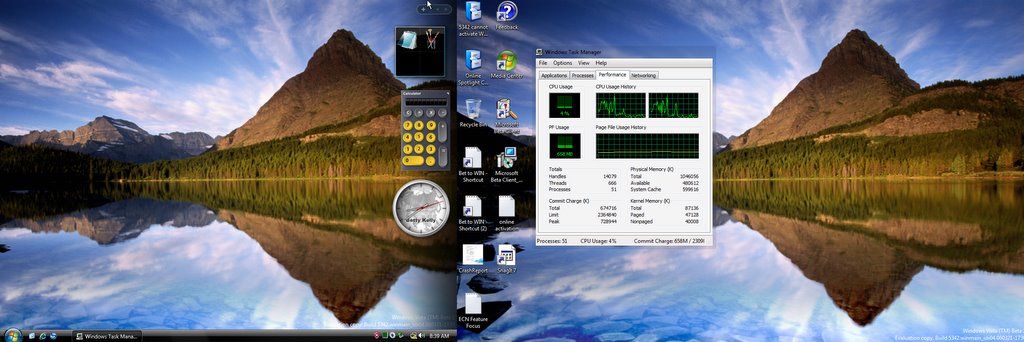
'Online Spotlight' and 'Live TV' Bug
I encountered a serious bug in viewing "Online Spotlight". The system crash suddenly and reports has been forwarded to Microsoft for analyzing. Again 'Live TV' got the same problem. Here comes the screenshot for my Dual-Monitor. Take a look at the Broken Aero Effect :)
DL
3/23/2006 Build 5342 (X64) - Download Only
3/24/2006 Build 5342 (X86) - Download Only
There will be no other SKUs or platforms available for this release nor is physical media available for this release. You will need to download new keys for this release from the "Product Keys" link in the left-hand pane.
Other DL
3/24/2006 IEAK for Feb CTP Internet Explorer Administration Kit for Windows Vista Feb CTP.
Please be sure to read the release notes included in the zip.
3/27/2006 ECN Feature Focus Instructions (March 29)
Explicit Congestion Notification (ECN) is a mechanism that allows hosts to be aware of congestion on the network before actual packet loss is encountered.
The goal of the feature focus is to assess the impact on the general connectivity with or without the ECN capability built into Windows Vista.
Activation Bug
I submit the bugs to Microsoft. Minutes later she response in "Connect" as following:-
Announcements and Events Activation - v.5342 - Activation for both X86 and X64 platforms is currently non-functional. We estimate this to be resolved by Friday at the latest.
Update: 3-31-06 - Activation issues have been resolved.
20060324
DL - Networking Applications & 5308 Symbols
3/21/2006 Networking Applications FF Backgroup
In this feature focus, you will get a chance to play with various networking applications. Not only we are interested in finding out what applications work or don’t work, we are also interested in getting your feedback regarding overall application experience (from GUI malfunctions to speed experience).
3/22/2006 5308 Symbols
The following symbol packages are available for download in this package. These symbols will work with all 5038.X builds.
Windows_Vista.amd64.chk.5308.060223-2145.CTP.symbols.exe
Windows_Vista.amd64.fre.5308.060223-2145.CTP.symbols.exe
Windows_Vista.ia64.chk.5308.060223-2145.CTP.symbols.exe
Windows_Vista.ia64.fre.5308.060223-2145.CTP.symbols.exe
Windows_Vista.x86.chk.5308.060223-2145.CTP.symbols.exe
Windows_Vista.x86.fre.5308.060223-2145.CTP.symbols.exe
In this feature focus, you will get a chance to play with various networking applications. Not only we are interested in finding out what applications work or don’t work, we are also interested in getting your feedback regarding overall application experience (from GUI malfunctions to speed experience).
3/22/2006 5308 Symbols
The following symbol packages are available for download in this package. These symbols will work with all 5038.X builds.
Windows_Vista.amd64.chk.5308.060223-2145.CTP.symbols.exe
Windows_Vista.amd64.fre.5308.060223-2145.CTP.symbols.exe
Windows_Vista.ia64.chk.5308.060223-2145.CTP.symbols.exe
Windows_Vista.ia64.fre.5308.060223-2145.CTP.symbols.exe
Windows_Vista.x86.chk.5308.060223-2145.CTP.symbols.exe
Windows_Vista.x86.fre.5308.060223-2145.CTP.symbols.exe
20060322
DL - User State Migration Tool v3.0
3/20/2006 User State Migration Tool v3.0
This is preliminary release documentation and is subject to change.
You can use Microsoft® Windows® User State Migration Tool (USMT) 3.0 to migrate user files and settings during large deployments of Microsoft Windows XP and Microsoft Windows Vista™ operating systems. USMT captures desktop, and application settings, as well as user accounts and users' files, and then migrates them to a new Windows installation. Using USMT can help you improve and simplify your migration process. You can use USMT for both side-by-side and wipe-and-load migrations. If you are only upgrading your operating system, USMT is not needed.
This is preliminary release documentation and is subject to change.
You can use Microsoft® Windows® User State Migration Tool (USMT) 3.0 to migrate user files and settings during large deployments of Microsoft Windows XP and Microsoft Windows Vista™ operating systems. USMT captures desktop, and application settings, as well as user accounts and users' files, and then migrates them to a new Windows installation. Using USMT can help you improve and simplify your migration process. You can use USMT for both side-by-side and wipe-and-load migrations. If you are only upgrading your operating system, USMT is not needed.
20060315
DL - What happen :)
3/6/2006 Display Diagnostic Utility
This utility is used for diagnosing certain types of display problems. You don't need to download it unless someone from Microsoft requests that you do so.
3/6/2006 Release Notes Addendum for This Beta Release of Windows Server Code Name Longhorn and Windows Vista
3/10/2006 64-bit Nvidia Graphics Beta Driver -0310
64-bit Nvidia Graphics Beta Driver for MC Testers
3/10/2006 32-bit Nvidia Graphics Beta Driver
32-bit Nvidia Graphics Beta Driver
This utility is used for diagnosing certain types of display problems. You don't need to download it unless someone from Microsoft requests that you do so.
3/6/2006 Release Notes Addendum for This Beta Release of Windows Server Code Name Longhorn and Windows Vista
3/10/2006 64-bit Nvidia Graphics Beta Driver -0310
64-bit Nvidia Graphics Beta Driver for MC Testers
3/10/2006 32-bit Nvidia Graphics Beta Driver
32-bit Nvidia Graphics Beta Driver
20060309


20060307
Release Notes Addendum
3/6/2006 Release Notes Addendum for This Beta Release of Windows Server Code Name "Longhorn" and Windows Vista
Error: The system has encountered an unexpected error. We apologize for the inconvenience. The issue will be addressed as quickly as possible.
Most Official Beta Tester encounter the above sometimes. Hope Microsoft can do something on that.
Error: The system has encountered an unexpected error. We apologize for the inconvenience. The issue will be addressed as quickly as possible.
Most Official Beta Tester encounter the above sometimes. Hope Microsoft can do something on that.
20060303
DL - a new video on how to file a great BUG
2/27/2006 Video - How to File a Better Bug - Hardware & Drivers (titled)
Size: 22.06 MB
WindowsVistaBetterBugs1H&Dtitled.wmv = A new video by the Windows Beta Team on how to file a great bug (with subtitles)!
Size: 22.06 MB
WindowsVistaBetterBugs1H&Dtitled.wmv = A new video by the Windows Beta Team on how to file a great bug (with subtitles)!
20060302
DL - FEB CTP Unstaged Package & Server Core
2/28/2006 Windows Build 5308 Main (Windows Vista - Longhorn Server) 32 bit DVD 2/28/2006 Windows Build 5308 Main (Windows Vista - Longhorn Server) 64 bit DVD
3/1/2006 Windows Build 5308 Main (Windows Vista - Longhorn Server) 64 bit Checked Version DVD
3/1/2006 Windows Build 5308 Main (Windows Vista - Longhorn Server) 32 bit Checked Version DVD
Unstaged vs Staged ?
1/. Unstaged Build has the DVD codec & Window DVD maker.
2/. Staged build 5308.17 vs unstaged 5308.60
(Server Core)
2/28/2006 Windows Build 5308 Server Core 64 bit DVD
2/28/2006 Windows Build 5308 Server Core 32 bit DVD
(Other Languages)
I don't know Japanses/German so I won't be using the ava ISO.
3/1/2006 Windows Build 5308 Main (Windows Vista - Longhorn Server) 64 bit Checked Version DVD
3/1/2006 Windows Build 5308 Main (Windows Vista - Longhorn Server) 32 bit Checked Version DVD
Unstaged vs Staged ?
1/. Unstaged Build has the DVD codec & Window DVD maker.
2/. Staged build 5308.17 vs unstaged 5308.60
(Server Core)
2/28/2006 Windows Build 5308 Server Core 64 bit DVD
2/28/2006 Windows Build 5308 Server Core 32 bit DVD
(Other Languages)
I don't know Japanses/German so I won't be using the ava ISO.
20060301
More, more DL
2/27/2006 Deployment Tools Test Information
2/28/2006 Windows Build 5308 Server Core 64 bit CD
2/28/2006 Windows Build 5308 Server Core 32 bit CD
Longhorn Server seems approaching its feature complete status.
2/28/2006 Windows Build 5308 Server Core 64 bit CD
2/28/2006 Windows Build 5308 Server Core 32 bit CD
Longhorn Server seems approaching its feature complete status.
20060228
Feb CTP have 8 images
FebCTP_5308_32bit_Main_Staged_DVD.iso
FebCTP_5308_64bit_Main_Staged_DVD.iso
The iso image have 8 versions.
Windows Vista BUSINESS
Windows Vista HOMEPREMIUM
Windows Vista HOMEBASIC
Windows Vista ULTIMATE
(Product key provided by Microsoft for testing)
Windows Vista BUSINESSN
Windows Vista ENTERPRISE
Windows Vista HOMEBASICN
Windows Vista STARTER
(Not yet for testing)
FebCTP_5308_64bit_Main_Staged_DVD.iso
The iso image have 8 versions.
Windows Vista BUSINESS
Windows Vista HOMEPREMIUM
Windows Vista HOMEBASIC
Windows Vista ULTIMATE
(Product key provided by Microsoft for testing)
Windows Vista BUSINESSN
Windows Vista ENTERPRISE
Windows Vista HOMEBASICN
Windows Vista STARTER
(Not yet for testing)
More DL
2/27/2006 12:00:00 AM CRC Checking Utility
2/27/2006 12:00:00 AM High DPI Feature Focus Documentation
2/27/2006 12:00:00 AM Windows Build 5308 Main 64 bit DVD - German Edition
2/27/2006 12:00:00 AM Windows Build 5308 Main 64 bit DVD - Japanese Edition
2/22/2006 12:00:00 AM Media Center End User Hardware Requirement Information
2/22/2006 12:00:00 AM Windows Vista, Longhorn Server Release Notes for February CTP
2/22/2006 12:00:00 AM Media Center Feb CTP SDK
2/27/2006 12:00:00 AM FebCTP_5308_32bit_Main_Staged_DVD.iso - German Edition
2/27/2006 12:00:00 AM Windows Build 5308 Main 32 bit DVD - Japanese Edition
2/22/2006 12:00:00 AM February CTP Windows Driver Kit
2/22/2006 12:00:00 AM February CTP Platform Software Developer Kit
Quote from Microsoft: High DPI Feature Focus
1. Introduction
Windows Vista provides an improved experience for users with high-density video displays. A high-density display is any display which supports more than 96 DPI (dots per inch). Hardware manufacturers are already shipping high-density video displays for some computer systems, primarily laptop displays. We would like to get your feedback on this feature in Windows Vista.
Note: you do not need to have high-density hardware to evaluate this feature; however, you do need to have a WDDM-compatible video card and driver that will support Desktop Composition (more details are provided below.)
2/27/2006 12:00:00 AM High DPI Feature Focus Documentation
2/27/2006 12:00:00 AM Windows Build 5308 Main 64 bit DVD - German Edition
2/27/2006 12:00:00 AM Windows Build 5308 Main 64 bit DVD - Japanese Edition
2/22/2006 12:00:00 AM Media Center End User Hardware Requirement Information
2/22/2006 12:00:00 AM Windows Vista, Longhorn Server Release Notes for February CTP
2/22/2006 12:00:00 AM Media Center Feb CTP SDK
2/27/2006 12:00:00 AM FebCTP_5308_32bit_Main_Staged_DVD.iso - German Edition
2/27/2006 12:00:00 AM Windows Build 5308 Main 32 bit DVD - Japanese Edition
2/22/2006 12:00:00 AM February CTP Windows Driver Kit
2/22/2006 12:00:00 AM February CTP Platform Software Developer Kit
Quote from Microsoft: High DPI Feature Focus
1. Introduction
Windows Vista provides an improved experience for users with high-density video displays. A high-density display is any display which supports more than 96 DPI (dots per inch). Hardware manufacturers are already shipping high-density video displays for some computer systems, primarily laptop displays. We would like to get your feedback on this feature in Windows Vista.
Note: you do not need to have high-density hardware to evaluate this feature; however, you do need to have a WDDM-compatible video card and driver that will support Desktop Composition (more details are provided below.)
20060223
DL - Feb CTP 5308
FebCTP_5308_64bit_Main_Staged_DVD.iso, 3,675.94MB
FebCTP_5308_32bit_Main_Staged_DVD.iso, 2,780.79MB
Build number 5308.060217
For Media Center Beta Participant like me, another survey should be complete after successful installation.
FebCTP_5308_32bit_Main_Staged_DVD.iso, 2,780.79MB
Build number 5308.060217
For Media Center Beta Participant like me, another survey should be complete after successful installation.
20060218
DL
2/16/2006 12:00:00 AM
Protecting Critical Systems with IPsec/Server and Domain Isolation
- IPsec-Domain-Isolation-Using-Machine-and-User-Credentials-v3.doc
- IPsec-Domain-Isolation-Using-User-Credentials-v3.doc
- IPsec-Including-a-DC-in-a-DI-Deployment-v3.doc
- Server-Isolation-of-a-Line-of-Business-Server-with-User-Credentials-v3.doc
Protecting Critical Systems with IPsec/Server and Domain Isolation
- IPsec-Domain-Isolation-Using-Machine-and-User-Credentials-v3.doc
- IPsec-Domain-Isolation-Using-User-Credentials-v3.doc
- IPsec-Including-a-DC-in-a-DI-Deployment-v3.doc
- Server-Isolation-of-a-Line-of-Business-Server-with-User-Credentials-v3.doc
20060209
DL
2/7/2006 12:00:00
1/. Efficient Networking Vista Feature Focus Documentation
2/. Efficient Networking Vista Background Documentation
1/. Efficient Networking Vista Feature Focus Documentation
2/. Efficient Networking Vista Background Documentation
20060126
DL
01-23-2006 Hardware Specification Data EXE
Identification of ALL hardware on your machine and save/show as .xml format.
Of course, you have the option to send it to Microsoft. May be they will send you some new hardware for testing and retain it after Beta expired:)
Identification of ALL hardware on your machine and save/show as .xml format.
Of course, you have the option to send it to Microsoft. May be they will send you some new hardware for testing and retain it after Beta expired:)
20060119
WinSAT V6.0 Build-5270
WinSAT V6.0 Build-5270
Windows System Assessment Tool
Go test it yourself.
Start> run
Type the following command:
winsat dwm :Measure your - LDDM supported Display Card
winsat disk :Measure your - Storage performance
winsat mem :Measure your - Memory Bandwith
winsat aurora :Lovely moving aurora screen appear :)
winsat d3d :Measure your Direct3D Gaming Performance
Moving colored screen appear :)
winsat moobe :Check your OS regarding the followings.
Processor Performance (mine: 89.95 MB/s)
System Memory Bandwith (mine: 74144.34 MB/s)
Gaming Performance (mine: 1874.52 F/s <0.00>)
Disk Performance (mine: 246.53 MB/s)
Video Encode Time (mine: 16.31294 secs)
Video Decode Time (mine: 0.01596 secs)
WinSAT was found since Builds 5048.
Windows System Assessment Tool
Go test it yourself.
Start> run
Type the following command:
winsat dwm :Measure your - LDDM supported Display Card
winsat disk :Measure your - Storage performance
winsat mem :Measure your - Memory Bandwith
winsat aurora :Lovely moving aurora screen appear :)
winsat d3d :Measure your Direct3D Gaming Performance
Moving colored screen appear :)
winsat moobe :Check your OS regarding the followings.
Processor Performance (mine: 89.95 MB/s)
System Memory Bandwith (mine: 74144.34 MB/s)
Gaming Performance (mine: 1874.52 F/s <0.00>)
Disk Performance (mine: 246.53 MB/s)
Video Encode Time (mine: 16.31294 secs)
Video Decode Time (mine: 0.01596 secs)
WinSAT was found since Builds 5048.
20060116
Explanation of TAP
Technology Adoption Program (TAP )
- The granddaddy of Microsoft's beta programs centered on a core group of key customers and partners who are early adopters of key Microsoft technologies;
- Not a replacement for Microsoft's mega-beta tests (public and private) for products such as Windows, Office and Visual Studio. Instead, it's more of an "elite" beta-test program;
- Launced Winter 2003 which supersedes Microsoft's Early Adoption Program (EAP), Joint Development Program (JDP) & Rapid Deployment Program (RDP);
- Reserved for a select group of customers and partners with whom Microsoft is interested in holding "an ongoing dialogue on pre-release code," according to the company;
- All TAP participants are those who plan to put the beta code into early production;
- "TAP is a framework that gives customers a consistent view of pre-release customer programs," said Linda Apsley, lead program manager with Microsoft's Customer Experience Team;
- It is currently consists of four different programs namely: 1) Product validation (similar to the JDP); 2) Product evaluation (like a traditional beta program); 3) Rapid deployment (akin to the Microsoft RDP); 4) A new "solutions implementation" program that covers the post-RTM product phase.
- The granddaddy of Microsoft's beta programs centered on a core group of key customers and partners who are early adopters of key Microsoft technologies;
- Not a replacement for Microsoft's mega-beta tests (public and private) for products such as Windows, Office and Visual Studio. Instead, it's more of an "elite" beta-test program;
- Launced Winter 2003 which supersedes Microsoft's Early Adoption Program (EAP), Joint Development Program (JDP) & Rapid Deployment Program (RDP);
- Reserved for a select group of customers and partners with whom Microsoft is interested in holding "an ongoing dialogue on pre-release code," according to the company;
- All TAP participants are those who plan to put the beta code into early production;
- "TAP is a framework that gives customers a consistent view of pre-release customer programs," said Linda Apsley, lead program manager with Microsoft's Customer Experience Team;
- It is currently consists of four different programs namely: 1) Product validation (similar to the JDP); 2) Product evaluation (like a traditional beta program); 3) Rapid deployment (akin to the Microsoft RDP); 4) A new "solutions implementation" program that covers the post-RTM product phase.
Explanation of Aero, Aero Glass, Aero Express, Aero Diamond.
Aero (code-name) – an acronym for
Authentic,
Energetic,
Reflective,
Open.
Aero Glass
The full Windows Vista desktop experience. Built on the DWM (Desktop Window Manager) previously known as DCE (Desktop Compositing Engine), it adds support for
1) 3D Graphics,
2) Translucency,
3) Animation & other visual effects.
I explained, tested and distributed the whole concept as
Slow Motion "Sticky Mode" Revisited (Flip3D) dated Dec 29, 2005.
Aero Express*
AeroExpress, lacking many features of the highest level code-named Aero Glass. However, in December 2005, Microsoft announced that there would only be two levels available, "Windows Vista Aero" and "Windows Vista Basic", with the previous "Express" level integrated into the new "Windows Vista Aero" level. A control panel was added to enable the user to fine tune this functionality, such as being able to turn off the "glass" translucency effect. These levels are provided so that the Aero interface (to some extent) can be used with a relatively low-end graphics card.
*Aero Express does not use DWM. There is no SDK interface for changing from Aero Glass to Aero Express.
Aero Diamond
A variation of Aero, code-named "Aero Diamond", is slated to be the user interface for the Windows Vista Media Center Edition experience.
Authentic,
Energetic,
Reflective,
Open.
Aero Glass
The full Windows Vista desktop experience. Built on the DWM (Desktop Window Manager) previously known as DCE (Desktop Compositing Engine), it adds support for
1) 3D Graphics,
2) Translucency,
3) Animation & other visual effects.
I explained, tested and distributed the whole concept as
Slow Motion "Sticky Mode" Revisited (Flip3D) dated Dec 29, 2005.
Aero Express*
AeroExpress, lacking many features of the highest level code-named Aero Glass. However, in December 2005, Microsoft announced that there would only be two levels available, "Windows Vista Aero" and "Windows Vista Basic", with the previous "Express" level integrated into the new "Windows Vista Aero" level. A control panel was added to enable the user to fine tune this functionality, such as being able to turn off the "glass" translucency effect. These levels are provided so that the Aero interface (to some extent) can be used with a relatively low-end graphics card.
*Aero Express does not use DWM. There is no SDK interface for changing from Aero Glass to Aero Express.
Aero Diamond
A variation of Aero, code-named "Aero Diamond", is slated to be the user interface for the Windows Vista Media Center Edition experience.
20060114
DL - Media Center Diagnostic Tool (AGAIN)
01-10-2006 MCDiag January2006_011006
This time it works and really display the specification & errors if any on my MCE.
This time it works and really display the specification & errors if any on my MCE.
20060113
“Flight Simulator X”


“Flight Simulator X” which showcases the Windows Vista platform through stunning graphics and incredible realism.
20060112
The Distance between & The Lady & The Folded Chess Set


1st Pic: What's the distance between A/B/ C/ D ?
The same or just illusion..........
2nd Pic: The Lady
Sitting or Standing or........
3rd Pic: The Folded Chess Set
Are you looking from the top or the bottom of the chessboard?
It's boring to wait for Official Beta 2.
20060107
DL - Media Center Diagnostic Tool
01-06-2006 Media Center Diagnostic Tool
Stupid program that didn't do anything. Microsoft have again coding error in it. Hopefully they will release a second one soon.
Stupid program that didn't do anything. Microsoft have again coding error in it. Hopefully they will release a second one soon.
20060106
DL for that mis-writtenly expired MCE
All of us have our 5270 MCE application expired started 1 Jan 2006. I submit that bug (possibly sources code error that they forgot to check) on the same day.
However Microsoft speedly launched the following patches within 5 days for us. Thanks.
01-05-2006 Media Center Edition Update for 32 bit Windows Vista
01-05-2006 Media Center Edition Update for 64 bit Windows Vista
The MCE is back with live TV function (with NVIDIA_PureVideo_Decoder installed at your own cost) enabled.
Cheers 8)
However Microsoft speedly launched the following patches within 5 days for us. Thanks.
01-05-2006 Media Center Edition Update for 32 bit Windows Vista
01-05-2006 Media Center Edition Update for 64 bit Windows Vista
The MCE is back with live TV function (with NVIDIA_PureVideo_Decoder installed at your own cost) enabled.
Cheers 8)
20060103
Huge DL
Title: Vista Ascend Training Pre-Requisites
Date: 12/30/2005
Size: 3,730.5 MB
Only ava to selected testers like me:)
Date: 12/30/2005
Size: 3,730.5 MB
Only ava to selected testers like me:)
Subscribe to:
Posts (Atom)


